Get instant access to submit your prompt after successful payment.
🔒
Complete payment to unlock
📝
➜
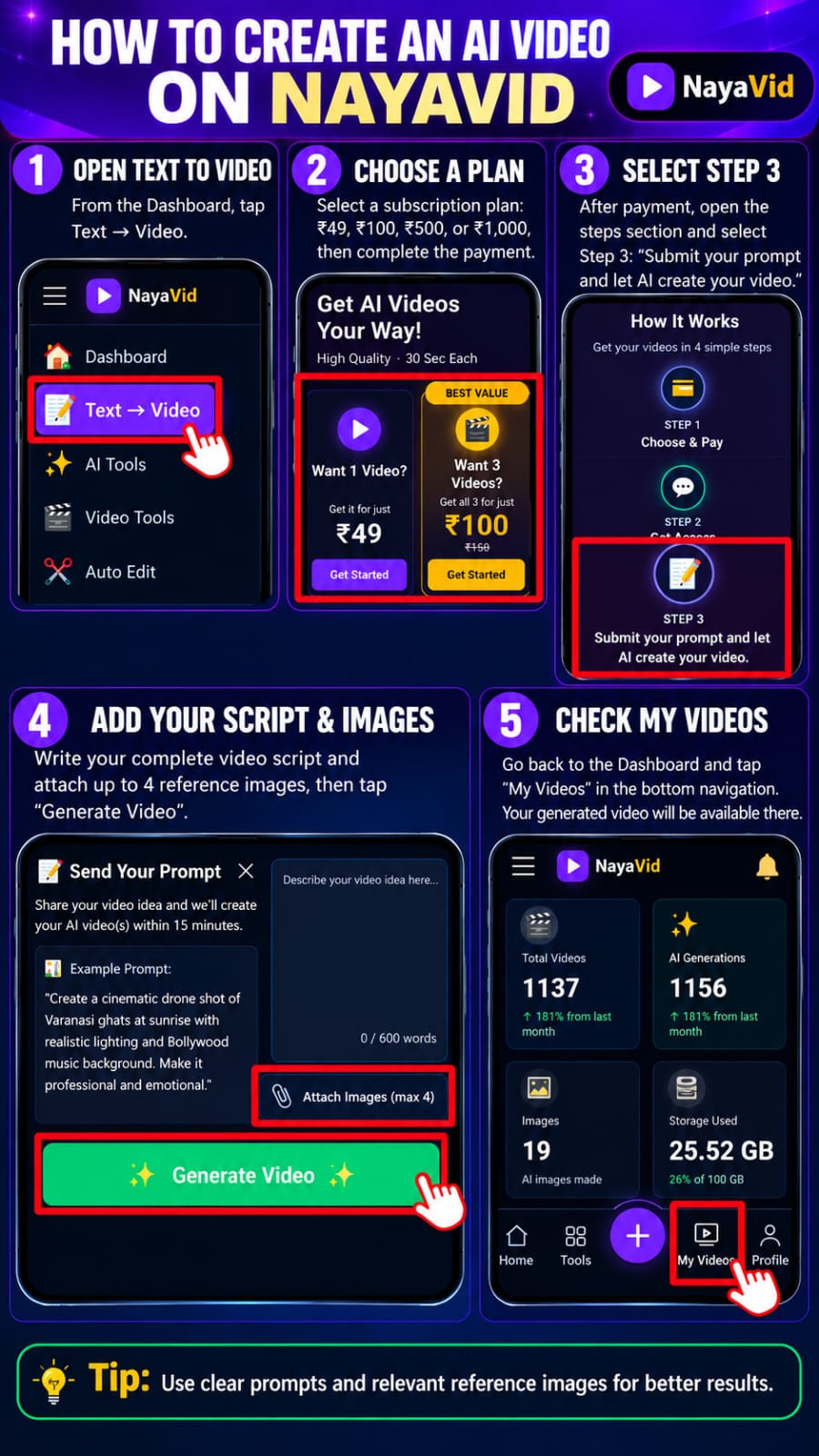
STEP 3
Submit your prompt and let AI create your video.
🔒
Complete payment to unlock
🎬
STEP 4
Receive Your Video
Get your AI-generated video in My Assets.
🔒
Complete payment to unlock
📝 Send Your Prompt
Share your video idea and we'll create your AI video(s) within 15 minutes.
📋 Example Prompt:
"Create a cinematic drone shot of Varanasi ghats at sunrise with realistic lighting and Bollywood music background. Make it professional and emotional."
✅
Your video is being generated. Please wait!
Your video idea has been received.
You'll get your video right here, usually within 15 minutes.
✓ Secure delivery · Your phone number is private
🎬 Your Videos
No videos yet
🎬 How to make a videoWatch demo video — from writing the script to downloading the finished video.
1Write Script
2Choose Style
3Generate
4Download
⚡ TRENDING TEMPLATES
One-click presets to get started faster
About Text to Video Maker
This text to video maker turns a written script into a fully narrated AI video — no camera, no editing software, and no voice recording needed. Type or paste your script, pick a Hindi or English voice, and NayaVid builds matching scenes, background music and captions around your words automatically.
How to use Text to Video Maker
Write or paste your script into the text box.
Choose a voice (Hindi or English, male or female) and a visual style.
Click Generate — the text to video engine writes scenes, adds voice and music, and renders the clip.
Preview the finished video and download it, ready for YouTube Shorts, Reels or WhatsApp.
Why use Text to Video Maker
A real text to video maker, not just a slideshow — scenes are generated to match what your script is actually saying.
Natural Hindi and English AI voices, not a robotic text-to-speech reader.
No editing skills, no stock footage hunting, no timeline to learn.
Works entirely in the browser on mobile or desktop — nothing to install.
Text to Video Maker — frequently asked questions
Is this a free text to video maker?
Yes — every new account gets free credits to generate a text to video, with paid credit packs available if you need more videos.
Can I make a text to video in Hindi?
Yes, Hindi is a first-class language here — pick a Hindi male or female AI voice and the narration, captions and scenes are generated for your Hindi script.
How is this different from a text-to-speech tool?
Text-to-speech only reads your words aloud. This text to video maker also builds visual scenes, background music and captions around the narration, so you get a finished video, not just an audio file.
How long can my script be?
The maximum script length depends on your plan — the word count allowed is shown right above the script box before you generate.
Do I need any video editing experience?
No. You only write the script — scene selection, pacing, voice and music are handled automatically.
🎬
Your video is being created!
It will be ready in ~20 minutes. You don't need to wait here —
you can close this page.
Save this link — guest videos aren't tied to an account.
Sign up to keep every video in My Assets.